How to Choose Grocery Store Price Labels?
Choosing grocery store price labels is not just a matter of picking a size or color. A shopper may compare two jars while a queue forms behind them. The price should be easy to spot, read, and match to the right product. Small mistakes matter. A faded label, a misplaced tag, or an unclear unit price can slow shoppers and create avoidable questions for staff.
Grocery analyst Phil Lempert is known for consumer-focused commentary on food retail and shopper trust. No source material was provided to verify a verbatim statement from him about price labels, so I won’t invent one. A practical principle for this guide is: “A price label should make the choice clearer, not slower.” That is an editorial summary, not a quote attributed to Lempert. It points to the essentials: legible type, strong contrast, accurate product matching, and a format employees can update consistently.
The right choice depends on the store. A compact neighborhood market may need flexible tags for frequent price changes, while a larger shop may prioritize uniform shelf strips and clear unit pricing. Consider glare from overhead lights, condensation near chilled displays, and the distance from which customers read each shelf. Then test the labels in a real aisle. Look closely. A format that seems clear on a computer screen may fail beside a crowded row of cereal boxes. No single label works everywhere; checking actual conditions is part of choosing well.
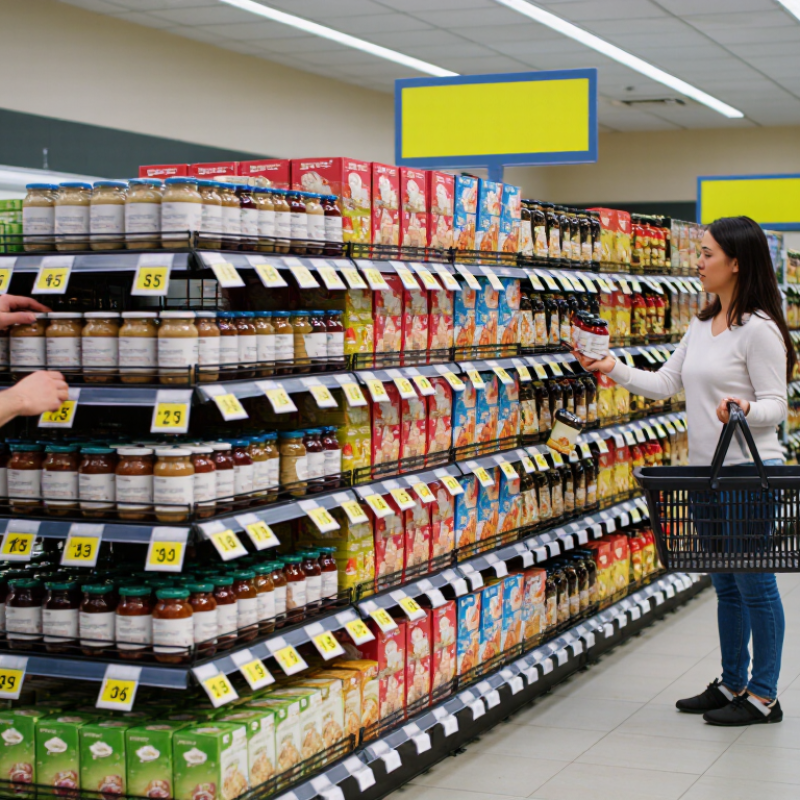
Understand the Role of Price Labels in Grocery Stores
In a grocery store, a price label does more than show a number. It connects a product to its price, size, and promotion at the exact point of choice. Clear labels help shoppers compare a 500-gram pack with a larger one, spot a temporary offer, and check the till price. Small details matter. A faint print or crowded shelf edge can make a simple comparison frustrating.
Price changes make accuracy especially important. The U.S. Bureau of Labor Statistics reported that food-at-home prices rose 1.2% on average in 2024, following a 5.0% increase in 2023. These figures, published in its Consumer Price Index data, show why stores need a dependable process for updating shelf information. A label can still be wrong. Staff need time to replace old prices, and busy aisles make missed tags possible.
Choosing labels means considering readability, durability, and how quickly staff can update them. Use lettering shoppers can read from normal standing distance, with enough contrast under bright aisle lighting. Keep the product name and unit price easy to locate; avoid squeezing several messages onto one small strip. The USDA Economic Research Service’s Food Price Outlook tracks food-price changes over time, but a national index cannot tell shoppers what one local shelf costs today. That gap matters. Current, legible labels give people a practical way to verify the price in front of them.
Identify Store Requirements and Label Information
Before choosing grocery store price labels, map the conditions in each aisle. A dry cereal shelf has different needs from a chilled dairy case. Note shelf-edge width, moisture, cleaning routines, and how often prices change. Start with the aisle. A quick walk-through can reveal narrow rails, glare from overhead lights, or labels that get bumped by baskets.
Decide what each label must show: product name, selling price, package size, and unit price when required by store policy or local rules. Promotional dates or loyalty pricing may also need clear space. Confirm these details with the people who maintain product data, not just the purchasing team. A label can look tidy and still confuse shoppers if its size is hard to find or its sale price lacks context.
Check that staff can update labels without slowing down restocking. If prices change often, test whether the print remains readable after repeated handling and routine cleaning. Small details matter. Use a sample on an actual shelf, then view it from a shopper’s usual distance. I once overlooked glare near a freezer door; the text looked sharp at eye level but faded from the aisle. Test before ordering in volume, and revisit the choice when fixtures or workflows change.
Compare Label Types, Materials, and Display Methods
Choose label types around the work shoppers and staff actually do. Paper shelf strips suit stable prices and long aisles. Adhesive labels fit produce bins, but moisture and cold can loosen them. For frequent promotions, reusable holders make changes faster. Electronic shelf labels update remotely, yet require power, system checks, and a higher initial investment. Keep it legible. Large numerals matter when shoppers compare prices from a cart.
Material choice should match the shelf environment. A chilled dairy case needs labels that resist condensation; dry-goods aisles may need only sturdy coated paper. Test adhesive on the actual shelf surface. Small details can fail in daily cleaning. The USDA estimates that 30–40% of the U.S. food supply is wasted. Clear markdown labels can help staff flag near-date items, though labels alone cannot prevent food waste.
Display method affects both accuracy and shopper confidence. Put unit prices beside selling prices, align labels with the correct product, and avoid glare on glossy holders. Use color sparingly for promotions, not as the only signal. A digital display can simplify rapid price changes, but a missed update may create confusion. Check labels during restocking and after promotions end. Test before rollout. A short pilot may reveal awkward sightlines or labels that peel sooner than expected.
Check Compatibility with Shelves and Pricing Systems
Measure the shelf before choosing a label. Check the rail’s height, groove shape, and usable depth, then test the label on an actual shelf section. A clip that almost fits can tilt, hide the price, or fall when staff restock heavy cartons. Check visibility under aisle lighting, too; glossy plastic can create glare.
Compatibility also means matching the store’s pricing workflow. Confirm that label fields support the required product code, unit price, promotions, and update schedule. GS1 product identification guidance can help teams align product records with identifiers such as GTINs. The U.S. Bureau of Labor Statistics reported that food-at-home prices rose 1.8% in the 12 months ending December 2024. Price files need to reach the shelf accurately. Test one ordinary price change and one promotion before rolling labels out widely. Still, it is easy to focus on the display and overlook the data handoff. A small pilot may reveal mismatched fields, delayed updates, or labels that staff cannot replace quickly.
Evaluate Readability, Durability, and Regulatory Needs
A grocery price label should be readable from the shopper’s normal viewing distance, not just up close. Use strong contrast, such as dark text on a light background, and keep prices larger than secondary details. Readability comes first. Glossy surfaces can reflect ceiling lights, so check samples under actual aisle lighting. Include clear units and sale dates where needed, and avoid squeezing too much information onto one strip.
Durability matters in busy stores. Labels near chilled cases may face condensation, while produce areas can expose them to moisture and frequent wiping. Choose materials and adhesives suited to the shelf surface and cleaning routine. Test a sample through several cleaning cycles; a label that curls at the edge can hide a digit. I have seen teams focus on print quality and overlook adhesive performance. That is an easy mistake to make.
Regulatory needs vary by location and product type. Check current local requirements for price display, unit pricing, sale periods, and any required measurement details. Keep a review process for price changes, so shelf labels match checkout prices. A simple checklist helps, though it can miss unusual promotions. For uncertain cases, confirm details with the relevant authority or a qualified compliance adviser before printing labels in bulk.